Creator: Chung-En Johnny Yu
Content update: 2026/02/06
Source:
Build a Large Language Model From Scratch by Sebastian Raschka - Ch5
Hands-on practice this notebook on your Google Colab:
Now, run the code and practice it!
Additional resources (not included in this notebook):
Dr. Raschka’s Original Code for advanced training techniques (e.g., learning rate warmup, cosine annealing, and gradient clipping).
Dr. Raschka’s Original Code for an alternative way to load the weights from the Hugging Face Hub.
Dr. Raschka’s Original Code for seeing how the GPT architecture compares to the Llama architecture.
from importlib.metadata import version

pkgs = ["matplotlib",
        "numpy",
        "tiktoken",
        "torch",
        "tensorflow" # For OpenAI's pretrained weights
       ]
for p in pkgs:
    print(f"{p} version: {version(p)}")
matplotlib version: 3.10.0
numpy version: 2.0.2
tiktoken version: 0.12.0
torch version: 2.9.0+cu126
tensorflow version: 2.19.0
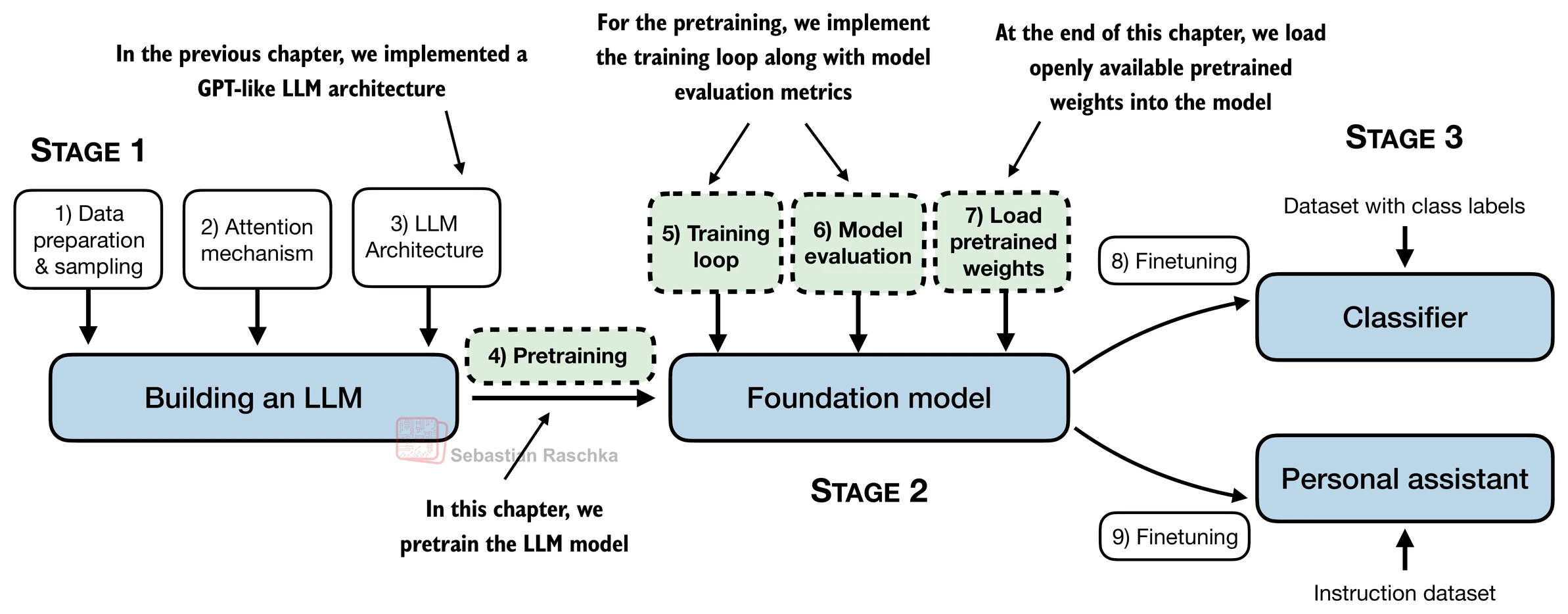
Evaluating generative text models
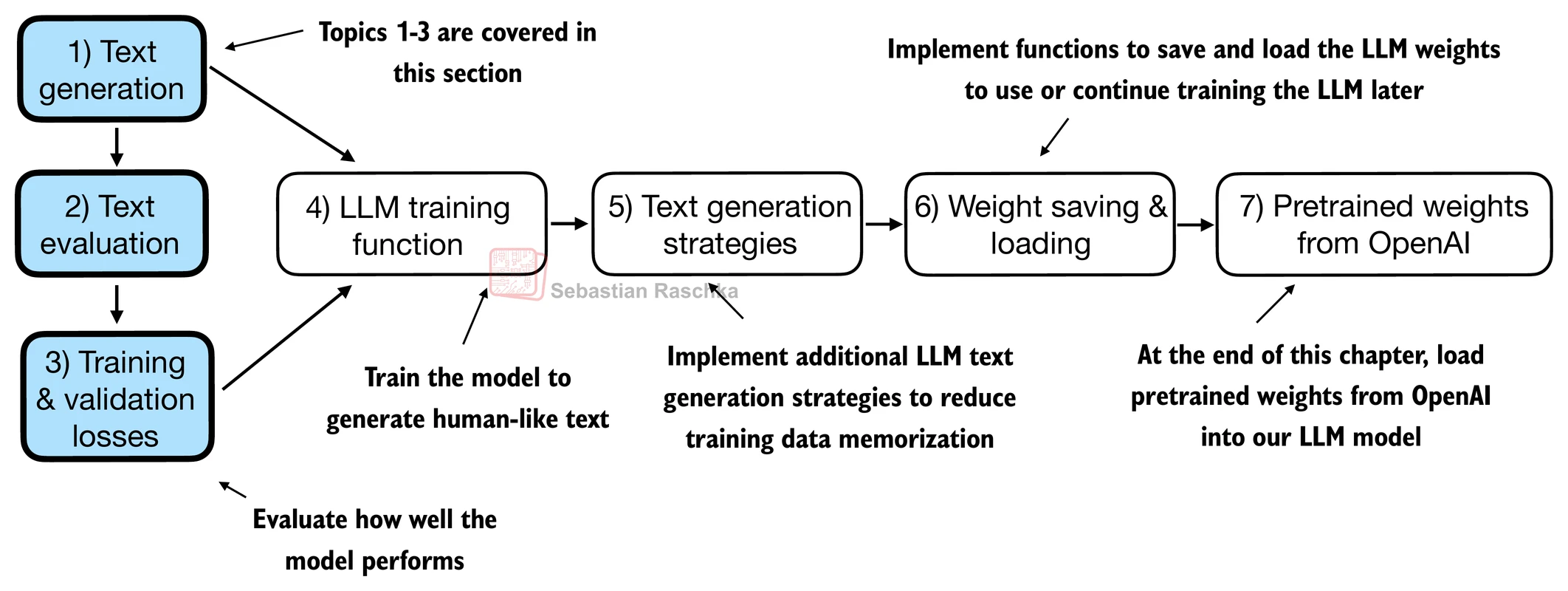
Using GPT to generate text
We initialize a GPT model using the code (by Dr. Rsachka) from the previous chapter.
# Download the file from my github
# Note that we save the file in the temporary folder of Google Colab,
# it will dispear once you close the session.
!wget -O /content/previous_chapters.py https://raw.githubusercontent.com/chungenyu6/chung_en_johnny_yu_website/main/02-LLM/04-pretraining/data/previous_chapters.py

!wget -O /content/gpt_download.py https://raw.githubusercontent.com/chungenyu6/chung_en_johnny_yu_website/main/02-LLM/04-pretraining/data/gpt_download.py
--2026-02-07 04:47:19-- https://raw.githubusercontent.com/chungenyu6/chung_en_johnny_yu_website/main/02-LLM/04-pretraining/data/previous_chapters.py
Resolving raw.githubusercontent.com (raw.githubusercontent.com)... 185.199.108.133, 185.199.109.133, 185.199.110.133, ...
Connecting to raw.githubusercontent.com (raw.githubusercontent.com)|185.199.108.133|:443... connected.
HTTP request sent, awaiting response... 200 OK
Length: 9905 (9.7K) [text/plain]
Saving to: ‘/content/previous_chapters.py’
/content/previous_c 100%[===================>] 9.67K --.-KB/s in 0s
2026-02-07 04:47:19 (101 MB/s) - ‘/content/previous_chapters.py’ saved [9905/9905]
--2026-02-07 04:47:19-- https://raw.githubusercontent.com/chungenyu6/chung_en_johnny_yu_website/main/02-LLM/04-pretraining/data/gpt_download.py
Resolving raw.githubusercontent.com (raw.githubusercontent.com)... 185.199.108.133, 185.199.111.133, 185.199.110.133, ...
Connecting to raw.githubusercontent.com (raw.githubusercontent.com)|185.199.108.133|:443... connected.
HTTP request sent, awaiting response... 200 OK
Length: 5972 (5.8K) [text/plain]
Saving to: ‘/content/gpt_download.py’
/content/gpt_downlo 100%[===================>] 5.83K --.-KB/s in 0s
2026-02-07 04:47:20 (83.8 MB/s) - ‘/content/gpt_download.py’ saved [5972/5972]
Note for the following code block:
We use dropout of 0.1 above, but it’s relatively common to train LLMs without dropout nowadays.
Modern LLMs also don’t use bias vectors in the
nn.Linearlayers for the query, key, and value matrices (unlike earlier GPT models), which is achieved by setting"qkv_bias": False.We reduce the context length (
context_length) of only 256 tokens to reduce the computational resource requirements for training the model, whereas the original 124 million parameter GPT-2 model used 1024 tokens.
import torch
import sys
sys.path.insert(0, '/content')
from previous_chapters import GPTModel

GPT_CONFIG_124M = {
    "vocab_size": 50257,   # Vocabulary size
    "context_length": 256, # Shortened context length (original: 1024)
    "emb_dim": 768,        # Embedding dimension
    "n_heads": 12,         # Number of attention heads
    "n_layers": 12,        # Number of layers
    "drop_rate": 0.1,      # Dropout rate
    "qkv_bias": False      # Query-key-value bias
}

torch.manual_seed(123)
model = GPTModel(GPT_CONFIG_124M)
model.eval();  # Disable dropout during inference
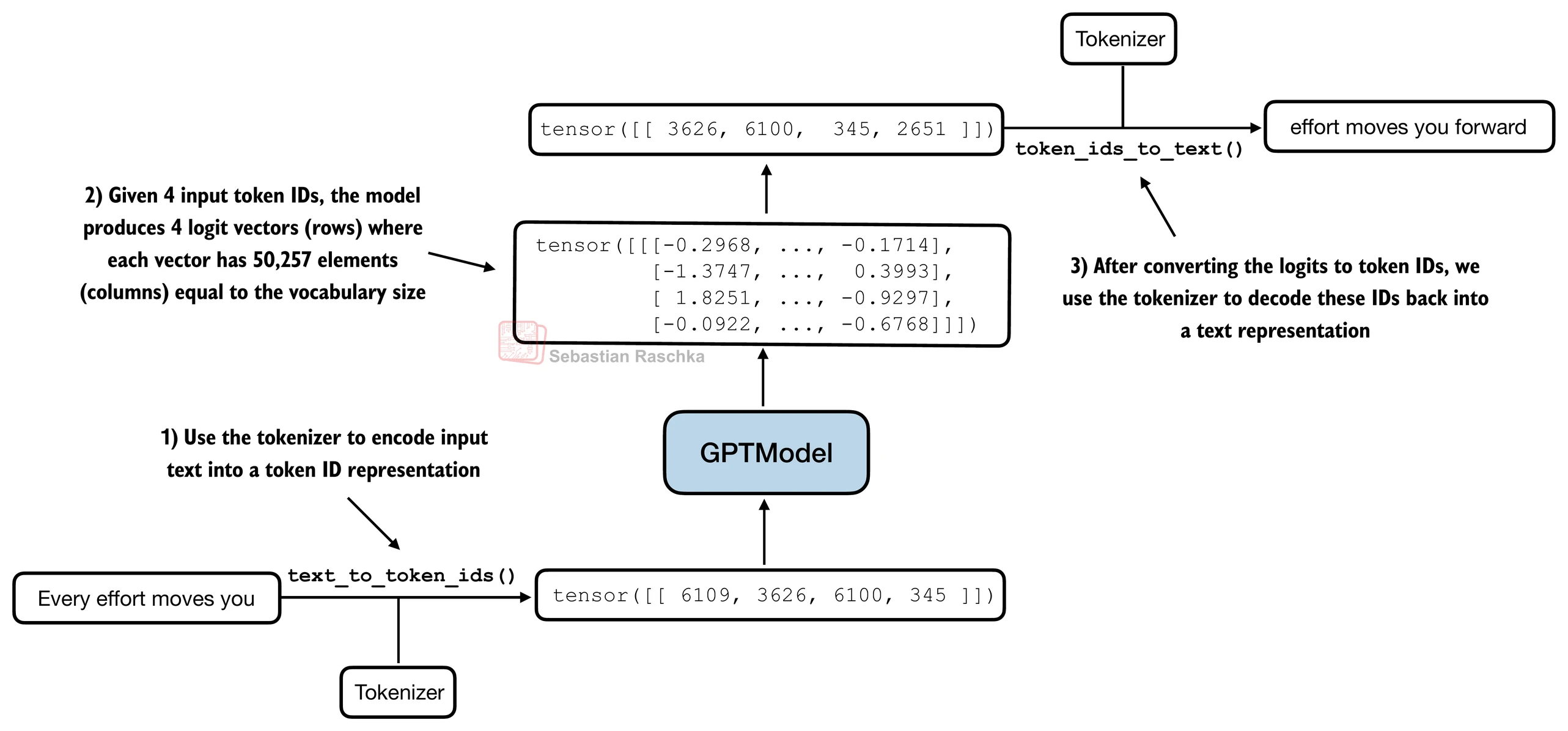
Next, we use the generate_text_simple function from the previous_chapter.py to generate text.
In addition, we define two convenience functions, text_to_token_ids and token_ids_to_text, for converting between token and text representations that we use throughout this notebook.
import tiktoken
from previous_chapters import generate_text_simple


def text_to_token_ids(text, tokenizer):
    encoded = tokenizer.encode(text, allowed_special={'<|endoftext|>'})
    encoded_tensor = torch.tensor(encoded).unsqueeze(0) # add batch dimension
    return encoded_tensor

def token_ids_to_text(token_ids, tokenizer):
    flat = token_ids.squeeze(0) # remove batch dimension
    return tokenizer.decode(flat.tolist())

start_context = "Every effort moves you"
tokenizer = tiktoken.get_encoding("gpt2")

token_ids = generate_text_simple(
    model=model,
    idx=text_to_token_ids(start_context, tokenizer),
    max_new_tokens=10,
    context_size=GPT_CONFIG_124M["context_length"]
)

print("Output text:\n", token_ids_to_text(token_ids, tokenizer))
Output text:
Every effort moves you rentingetic wasnم refres RexMeCHicular stren
As we can see above, the model does not produce “good text” because it has not been trained yet.
Q: How do we measure or capture what “good text” is, in a numeric form, to track it during training?
A: Let’s introduce metrics to calculate a loss metric for the generated outputs that we can use to measure the training progress.
Text generation loss: cross-entropy and perplexity
Suppose we have an inputs tensor containing the token IDs for 2 training examples (rows).
1st sentence: (input) “every effort moves” ; (target) “you”
2nd sentence: (input) “I really like” ; (target) “chocolate”
Corresponding to the inputs, the targets contain the desired token IDs that we want the model to generate.
inputs = torch.tensor([[16833, 3626, 6100],   # ["every effort moves",
                       [40,    1107, 588]])   #  "I really like"]

# Shift 1 word right from inputs
targets = torch.tensor([[3626, 6100, 345  ],  # [" effort moves you",
                        [1107,  588, 11311]]) #  " really like chocolate"]
Outputs of the following code:
Feeding the
inputsto the model, we obtain the logits vector for the 2 input examples that consist of 3 tokens each.Each of the tokens is a 50,257-dimensional vector corresponding to the size of the vocabulary.
Applying the softmax function, we can turn the logits tensor into a tensor of the same dimension containing probability scores.
with torch.no_grad():
    logits = model(inputs)

probas = torch.softmax(logits, dim=-1) # Probability of each token in vocabulary
print(probas.shape) # Shape: (batch_size, num_tokens, vocab_size)
torch.Size([2, 3, 50257])
The figure below, using a very small vocabulary for illustration purposes, outlines how we convert the probability scores back into text.
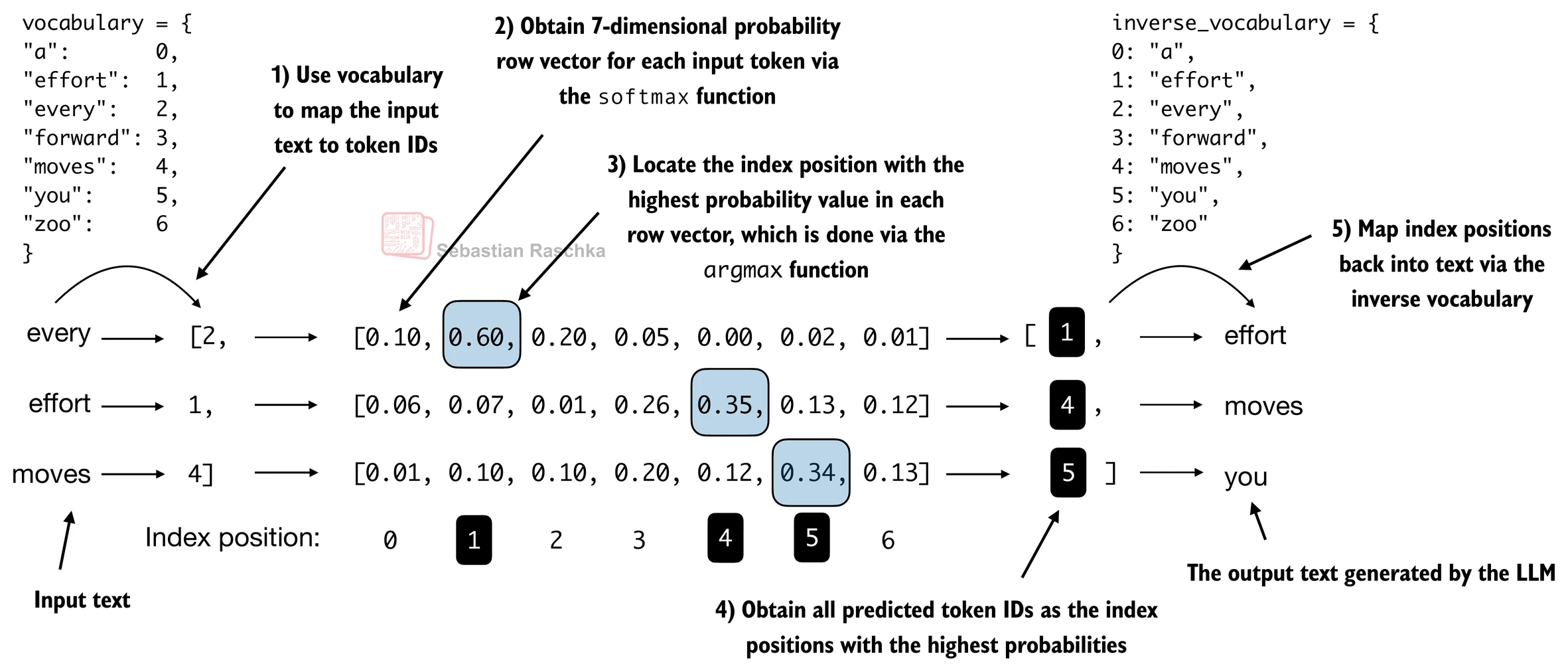
Since we have 2 input batches with 3 tokens each, we obtain 2 by 3 predicted token IDs:
token_ids = torch.argmax(probas, dim=-1, keepdim=True)
print("Token IDs:\n", token_ids)
Token IDs:
tensor([[[16657],
[ 339],
[42826]],
[[49906],
[29669],
[41751]]])
If we decode these tokens, we find that these are quite different from the tokens we want the model to predict, because the model wasn’t trained yet.
print(f"Targets batch 1: {token_ids_to_text(targets[0], tokenizer)}")
print(f"Outputs batch 1: {token_ids_to_text(token_ids[0].flatten(), tokenizer)}")
Targets batch 1: effort moves you
Outputs batch 1: Armed heNetflix
To train the model, we need to know how far it is away from the correct predictions (targets).
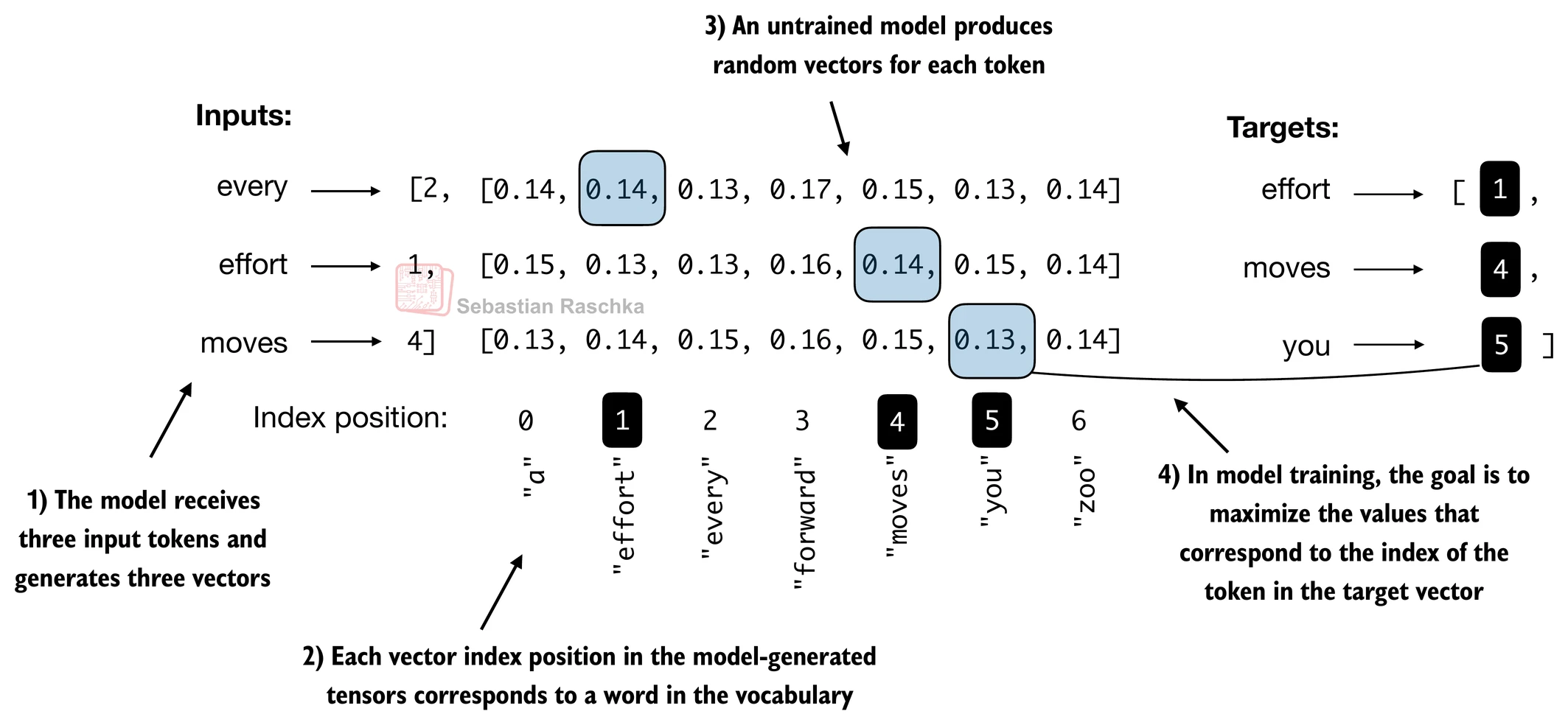
The token probabilities corresponding to the target indices are as follows:
text_idx = 0
target_probas_1 = probas[text_idx, [0, 1, 2], targets[text_idx]]
print("Text 1:", target_probas_1)

text_idx = 1
target_probas_2 = probas[text_idx, [0, 1, 2], targets[text_idx]]
print("Text 2:", target_probas_2)
Text 1: tensor([7.4540e-05, 3.1061e-05, 1.1563e-05])
Text 2: tensor([1.0337e-05, 5.6776e-05, 4.7559e-06])
We want to maximize all these values, bringing them close to a probability of 1.
In mathematical optimization, it is easier to maximize the logarithm of the probability score than the probability score itself.
# Compute logarithm of all token probabilities
log_probas = torch.log(torch.cat((target_probas_1, target_probas_2)))
print(log_probas)
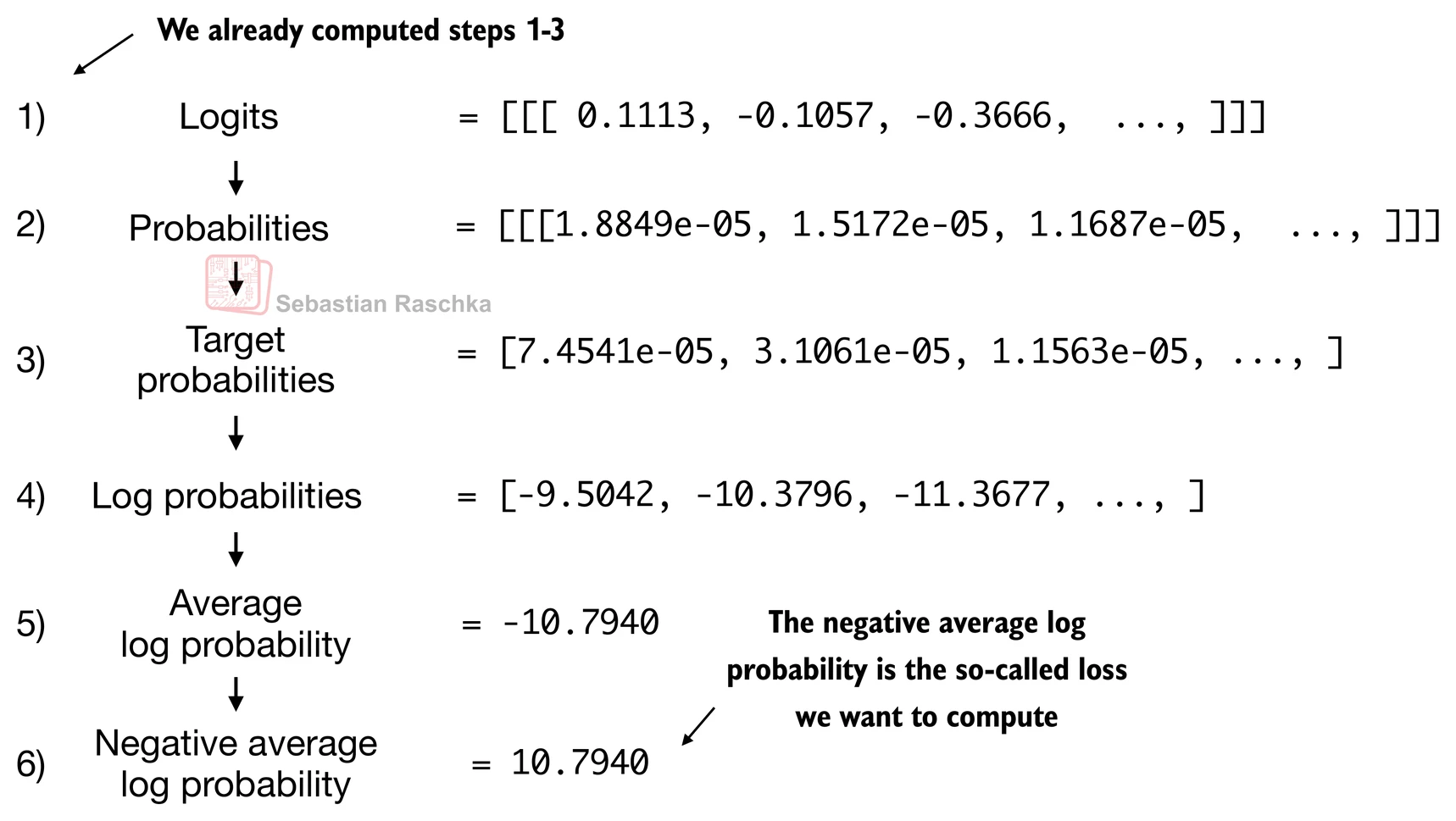
tensor([ -9.5042, -10.3796, -11.3677, -11.4798, -9.7764, -12.2561])
Next, we compute the average log probability:
# Calculate the average probability for each token
avg_log_probas = torch.mean(log_probas)
print(avg_log_probas)
tensor(-10.7940)
The goal is to make this average log probability as large as possible by optimizing the model weights. Due to the log, the largest possible value is 0, and we are currently far away from 0.
In deep learning, instead of maximizing the average log-probability, it’s a standard convention to minimize the negative average log-probability value ; in our case, instead of maximizing -10.7722 so that it approaches 0, in deep learning, we would minimize 10.7722 so that it approaches 0.
The value negative of -10.7722, i.e., 10.7722, is also called cross-entropy loss in deep learning.
neg_avg_log_probas = avg_log_probas * -1
print(neg_avg_log_probas)
tensor(10.7940)
Before we apply the cross_entropy function, let’s check the shape of the logits and targets:
# Logits have shape (batch_size, num_tokens, vocab_size)
print("Logits shape:", logits.shape)

# Targets have shape (batch_size, num_tokens)
print("Targets shape:", targets.shape)
Logits shape: torch.Size([2, 3, 50257])
Targets shape: torch.Size([2, 3])
For the cross_entropy function in PyTorch, we want to flatten these tensors by combining them over the batch dimension:
logits_flat = logits.flatten(0, 1)
targets_flat = targets.flatten()

print("Flattened logits:", logits_flat.shape)
print("Flattened targets:", targets_flat.shape)
Flattened logits: torch.Size([6, 50257])
Flattened targets: torch.Size([6])
Note that the targets are the token IDs, which also represent the index positions in the logits tensors that we want to maximize.
The
cross_entropyfunction in PyTorch will automatically take care of applying the softmax and log-probability computation internally over those token indices in the logits that are to be maximized.
loss = torch.nn.functional.cross_entropy(logits_flat, targets_flat)
print(loss)
tensor(10.7940)
The perplexity is simply the exponential of the cross-entropy loss.
perplexity = torch.exp(loss)
print(perplexity)
tensor(48725.8203)
The perplexity is often considered more interpretable because it can be understood as the effective vocabulary size that the model is uncertain about at each step (in the example above, that’d be 48,725 words or tokens).
In other words, perplexity provides a measure of how well the probability distribution predicted by the model matches the actual distribution of the words in the dataset.
Similar to the loss, a lower perplexity indicates that the model predictions are closer to the actual distribution. (lower perplexity, better prediction)
Training and validation set losses
Here, we use small dataset to illustrate training for saving time and cost.
For example, Llama 2 7B required 184,320 GPU hours on A100 GPUs to be trained on 2 trillion tokens.
At the time of this writing (2024), the hourly cost of an 8xA100 cloud server at AWS is approximately $30.
So, via an off-the-envelope calculation, training this LLM would cost 184,320 / 8 * $30 = $690,000.
import os
import requests

# fetch from original author's github
file_path = "the-verdict.txt"
url = "https://raw.githubusercontent.com/rasbt/LLMs-from-scratch/main/ch02/01_main-chapter-code/the-verdict.txt"

if not os.path.exists(file_path):
    response = requests.get(url, timeout=30)
    response.raise_for_status()
    text_data = response.text
    with open(file_path, "w", encoding="utf-8") as file:
        file.write(text_data)
else:
    with open(file_path, "r", encoding="utf-8") as file:
        text_data = file.read()
A quick check that the text loaded ok by printing the first and last 99 characters.
# First 99 characters
print(text_data[:99])
I HAD always thought Jack Gisburn rather a cheap genius--though a good fellow enough--so it was no
# Last 99 characters
print(text_data[-99:])
it for me! The Strouds stand alone, and happen once--but there's no exterminating our kind of art."
total_characters = len(text_data)
total_tokens = len(tokenizer.encode(text_data))

print("Characters:", total_characters)
print("Tokens:", total_tokens)
Characters: 20479
Tokens: 5145
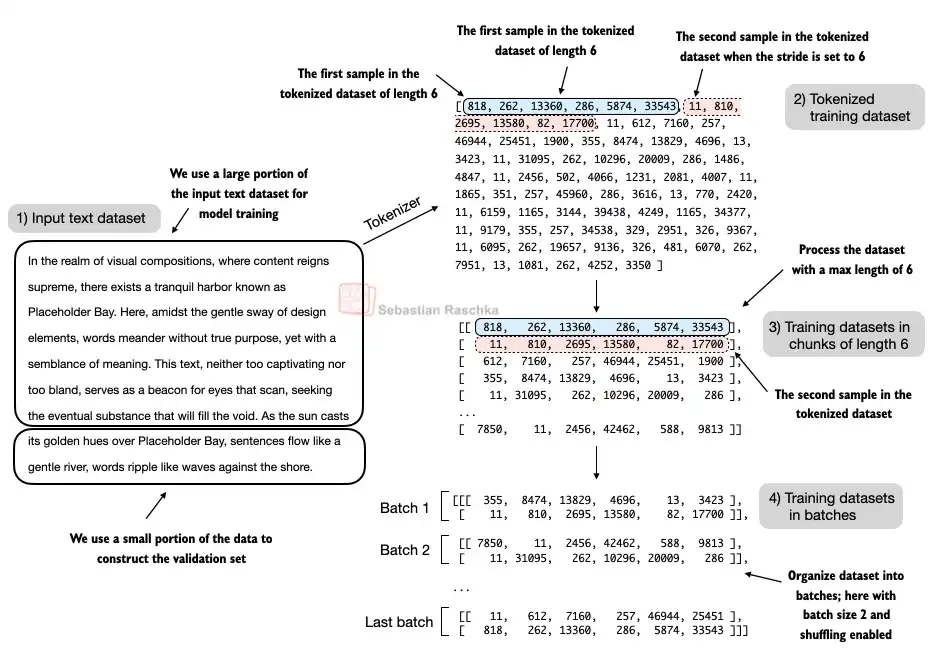
Next, we divide the dataset into a training and a validation set and use the data loaders from previous chapter (Tokenization) to prepare the batches for LLM training.
For visualization purposes, the figure below assumes a
max_length=6, but for the training loader, we set themax_lengthequal to the context length that the LLM supports.The figure below only shows the input tokens for simplicity. Since we train the LLM to predict the next word in the text, the targets look the same as these inputs, except that the targets are shifted by one position.
from previous_chapters import create_dataloader_v1

# Train/validation ratio
train_ratio = 0.90
split_idx = int(train_ratio * len(text_data))
train_data = text_data[:split_idx]
val_data = text_data[split_idx:]


torch.manual_seed(123)

train_loader = create_dataloader_v1(
    train_data,
    batch_size=2, # for tutorial purpose, we set it small
    max_length=GPT_CONFIG_124M["context_length"],
    stride=GPT_CONFIG_124M["context_length"],
    drop_last=True,
    shuffle=True,
    num_workers=0
)

val_loader = create_dataloader_v1(
    val_data,
    batch_size=2,
    max_length=GPT_CONFIG_124M["context_length"],
    stride=GPT_CONFIG_124M["context_length"],
    drop_last=False,
    shuffle=False,
    num_workers=0
)
# Sanity check
if total_tokens * (train_ratio) < GPT_CONFIG_124M["context_length"]:
print("Not enough tokens for the training loader. "
"Try to lower the `GPT_CONFIG_124M['context_length']` or "
"increase the `training_ratio`")
if total_tokens * (1-train_ratio) < GPT_CONFIG_124M["context_length"]:
print("Not enough tokens for the validation loader. "
"Try to lower the `GPT_CONFIG_124M['context_length']` or "
"decrease the `training_ratio`")We use a relatively small batch size to reduce the computational resource demand, and because the dataset is very small to begin with.
Llama 2 7B was trained with a batch size of 1024, for example.
# Check data is loaded
print("Train loader:")
for x, y in train_loader:
    print(x.shape, y.shape)

print("\nValidation loader:")
for x, y in val_loader:
    print(x.shape, y.shape)
Train loader:
torch.Size([2, 256]) torch.Size([2, 256])
torch.Size([2, 256]) torch.Size([2, 256])
torch.Size([2, 256]) torch.Size([2, 256])
torch.Size([2, 256]) torch.Size([2, 256])
torch.Size([2, 256]) torch.Size([2, 256])
torch.Size([2, 256]) torch.Size([2, 256])
torch.Size([2, 256]) torch.Size([2, 256])
torch.Size([2, 256]) torch.Size([2, 256])
torch.Size([2, 256]) torch.Size([2, 256])
Validation loader:
torch.Size([2, 256]) torch.Size([2, 256])
# Check if token sizes are in the expected ballpark
train_tokens = 0
for input_batch, target_batch in train_loader:
    train_tokens += input_batch.numel()

val_tokens = 0
for input_batch, target_batch in val_loader:
    val_tokens += input_batch.numel()

print("Training tokens:", train_tokens)
print("Validation tokens:", val_tokens)
print("All tokens:", train_tokens + val_tokens)
Training tokens: 4608
Validation tokens: 512
All tokens: 5120
Next, we implement a utility function to calculate the cross-entropy loss of a given batch.
In addition, we implement a second utility function to compute the loss for a user-specified number of batches in a data loader.
def calc_loss_batch(input_batch, target_batch, model, device):
    input_batch, target_batch = input_batch.to(device), target_batch.to(device)
    logits = model(input_batch)
    loss = torch.nn.functional.cross_entropy(logits.flatten(0, 1), target_batch.flatten())
    return loss


def calc_loss_loader(data_loader, model, device, num_batches=None):
    total_loss = 0.
    if len(data_loader) == 0:
        return float("nan")
    elif num_batches is None:
        num_batches = len(data_loader)
    else:
        # Reduce the number of batches to match the total number of batches in the data loader
        # if num_batches exceeds the number of batches in the data loader
        num_batches = min(num_batches, len(data_loader))
    for i, (input_batch, target_batch) in enumerate(data_loader):
        if i < num_batches:
            loss = calc_loss_batch(input_batch, target_batch, model, device)
            total_loss += loss.item()
        else:
            break
    return total_loss / num_batches
If you have a machine with a CUDA-supported GPU, the LLM will train on the GPU without making any changes to the code (which should be worked on Google Colab).
Via the
devicesetting, we ensure that the data is loaded onto the same device as the LLM model.
if torch.cuda.is_available():
    device = torch.device("cuda")
elif torch.backends.mps.is_available():
    # Use PyTorch 2.9 or newer for stable mps results
    major, minor = map(int, torch.__version__.split(".")[:2])
    if (major, minor) >= (2, 9):
        device = torch.device("mps")
    else:
        device = torch.device("cpu")
else:
    device = torch.device("cpu")


print(f"Using {device} device.")


model.to(device) # no assignment model = model.to(device) necessary for nn.Module classes


torch.manual_seed(123) # For reproducibility due to the shuffling in the data loader

with torch.no_grad(): # Disable gradient tracking for efficiency because we are not training, yet
    train_loss = calc_loss_loader(train_loader, model, device)
    val_loss = calc_loss_loader(val_loader, model, device)

print("Training loss:", train_loss)
print("Validation loss:", val_loss)
Using cuda device.
Training loss: 10.987583372328016
Validation loss: 10.98110580444336
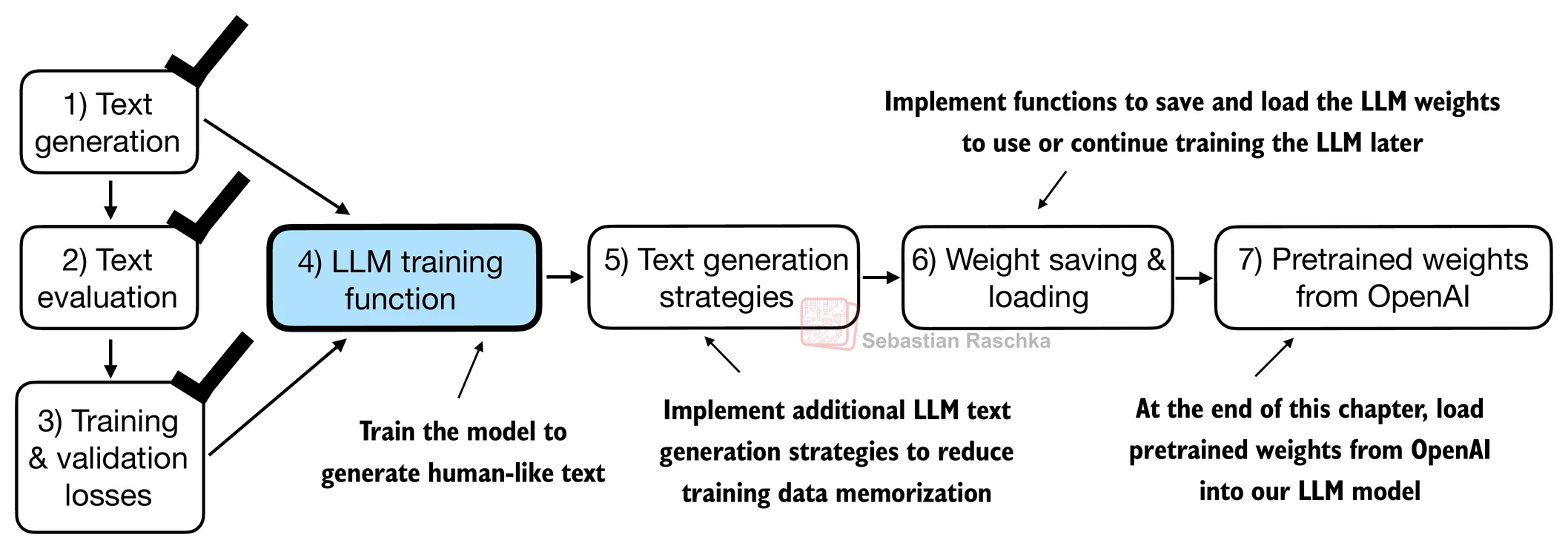
Training an LLM
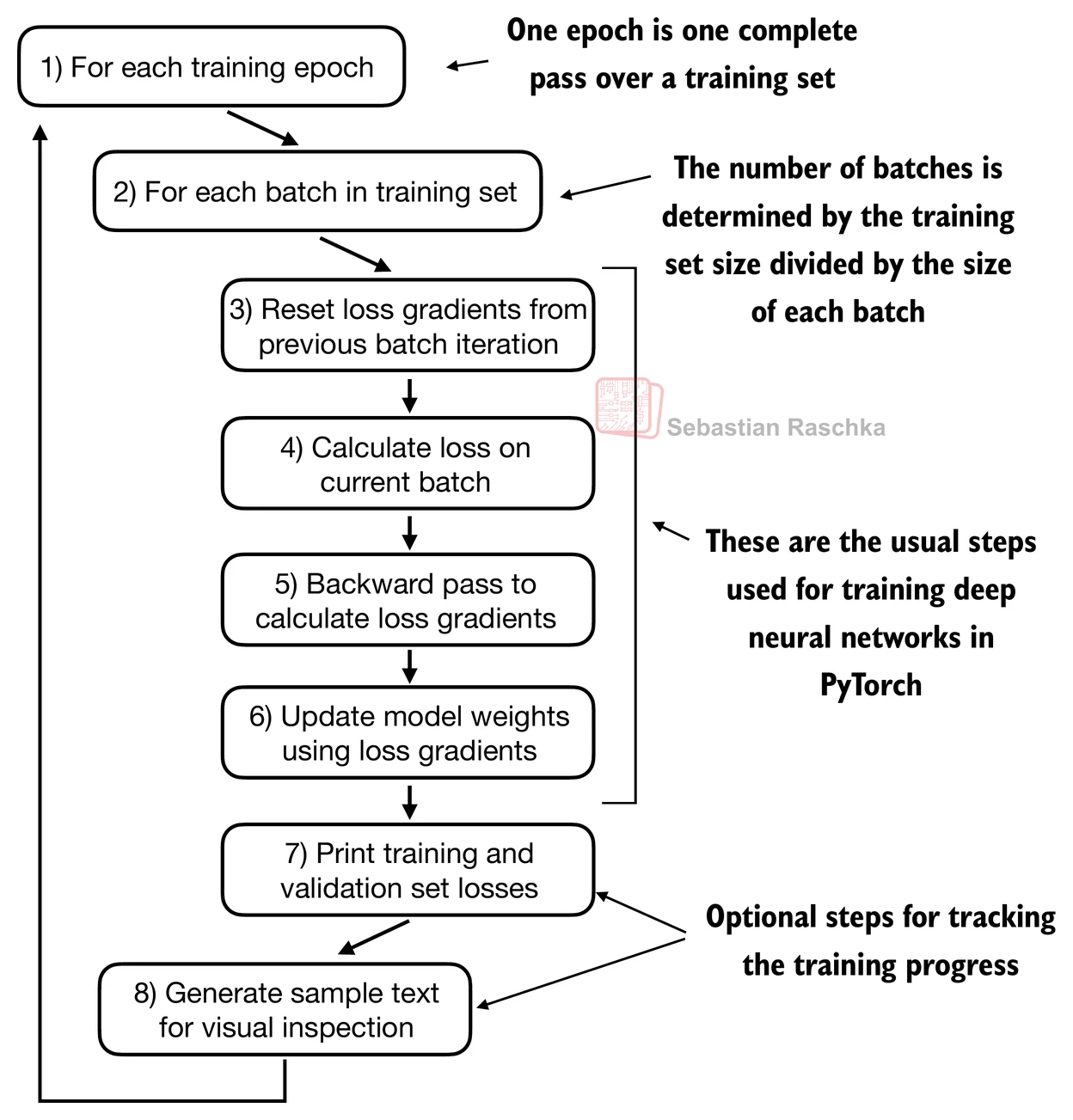
def train_model_simple(model, train_loader, val_loader, optimizer, device, num_epochs,eval_freq, eval_iter, start_context, tokenizer):
    # Initialize lists to track losses and tokens seen
    train_losses, val_losses, track_tokens_seen = [], [], []
    tokens_seen, global_step = 0, -1

    # Main training loop
    for epoch in range(num_epochs):
        model.train()  # Set model to training mode

        for input_batch, target_batch in train_loader:
            optimizer.zero_grad() # Reset loss gradients from previous batch iteration
            loss = calc_loss_batch(input_batch, target_batch, model, device)
            loss.backward() # Calculate loss gradients
            optimizer.step() # Update model weights using loss gradients
            tokens_seen += input_batch.numel()
            global_step += 1

            # Optional evaluation step
            if global_step % eval_freq == 0:
                train_loss, val_loss = evaluate_model(
                    model, train_loader, val_loader, device, eval_iter)
                train_losses.append(train_loss)
                val_losses.append(val_loss)
                track_tokens_seen.append(tokens_seen)
                print(f"Ep {epoch+1} (Step {global_step:06d}): "
                      f"Train loss {train_loss:.3f}, Val loss {val_loss:.3f}")

        # Print a sample text after each epoch
        generate_and_print_sample(
            model, tokenizer, device, start_context
        )

    return train_losses, val_losses, track_tokens_seen


def evaluate_model(model, train_loader, val_loader, device, eval_iter):
    model.eval()
    with torch.no_grad():
        train_loss = calc_loss_loader(train_loader, model, device, num_batches=eval_iter)
        val_loss = calc_loss_loader(val_loader, model, device, num_batches=eval_iter)
    model.train()
    return train_loss, val_loss


def generate_and_print_sample(model, tokenizer, device, start_context):
    model.eval()
    context_size = model.pos_emb.weight.shape[0]
    encoded = text_to_token_ids(start_context, tokenizer).to(device)
    with torch.no_grad():
        token_ids = generate_text_simple(
            model=model, idx=encoded,
            max_new_tokens=50, context_size=context_size
        )
    decoded_text = token_ids_to_text(token_ids, tokenizer)
    print(decoded_text.replace("\n", " "))  # Compact print format
    model.train()
Train the LLM using the training function defined above. And we can see that the model starts out generating incomprehensible strings of words, whereas towards the end, it’s able to produce grammatically more or less correct sentences.
# Calculate the execution time
import time
start_time = time.time()

torch.manual_seed(123)
model = GPTModel(GPT_CONFIG_124M)
model.to(device)
optimizer = torch.optim.AdamW(model.parameters(), lr=0.0004, weight_decay=0.1)

num_epochs = 10
train_losses, val_losses, tokens_seen = train_model_simple(
    model, train_loader, val_loader, optimizer, device,
    num_epochs=num_epochs, eval_freq=5, eval_iter=5,
    start_context="Every effort moves you", tokenizer=tokenizer
)

end_time = time.time()
execution_time_minutes = (end_time - start_time) / 60
print(f"Training completed in {execution_time_minutes:.2f} minutes.")
Ep 1 (Step 000000): Train loss 9.818, Val loss 9.930
Ep 1 (Step 000005): Train loss 8.066, Val loss 8.336
Every effort moves you,,,,,,,,,,,,.
Ep 2 (Step 000010): Train loss 6.623, Val loss 7.053
Ep 2 (Step 000015): Train loss 6.047, Val loss 6.605
Every effort moves you, and,, and,,,,,,, and,.
Ep 3 (Step 000020): Train loss 5.532, Val loss 6.507
Ep 3 (Step 000025): Train loss 5.399, Val loss 6.389
Every effort moves you, and to the to the of the to the, and I had. Gis, and, and, and, and, and, and I had the, and, and, and, and, and, and, and, and, and
Ep 4 (Step 000030): Train loss 4.895, Val loss 6.280
Ep 4 (Step 000035): Train loss 4.648, Val loss 6.304
Every effort moves you. "I the picture. "I"I the picture"I had the the honour of the picture and I had been the picture of
Ep 5 (Step 000040): Train loss 4.023, Val loss 6.165
Every effort moves you know
Ep 6 (Step 000045): Train loss 3.625, Val loss 6.172
Ep 6 (Step 000050): Train loss 3.045, Val loss 6.144
Every effort moves you know the was his a little the. "I had the last word. "Oh, and I had a little. "I looked, and I had a little of
Ep 7 (Step 000055): Train loss 2.948, Val loss 6.183
Ep 7 (Step 000060): Train loss 2.230, Val loss 6.128
Every effort moves you know the picture to have been too--I felt, and Mrs. "I was no--and the fact, and that, and I was his pictures. "I looked up his pictures--and--because he was a little
Ep 8 (Step 000065): Train loss 1.774, Val loss 6.162
Ep 8 (Step 000070): Train loss 1.475, Val loss 6.229
Every effort moves you?" "Yes--I glanced after him, and uncertain. "I looked up, and the fact, and to see a smile behind his close grayish beard--as if he had the donkey. "There were days when I
Ep 9 (Step 000075): Train loss 1.135, Val loss 6.268
Ep 9 (Step 000080): Train loss 0.858, Val loss 6.298
Every effort moves you?" "Yes--quite insensible to the fact with the last word. "I looked, and that, and I remember getting off a prodigious phrase about the honour being _mine_--because he's the first
Ep 10 (Step 000085): Train loss 0.627, Val loss 6.382
Every effort moves you?" "Yes--quite insensible to the irony. She wanted him vindicated--and by me!" He laughed again, and threw back his head to look up at the sketch of the donkey. "There were days when I
Training completed in 0.57 minutes.
Note that you might get slightly different loss values on your computer, which is not a reason for concern if they are roughly similar (a training loss below 1 and a validation loss below 7).
Small differences can often be due to different GPU hardware and CUDA versions or small changes in newer PyTorch versions.
Based on the training and validation set losses plot below, we can see that the model starts overfitting.
If we were to check a few passages it writes towards the end, we would find that they are contained in the training set verbatim -- it simply memorizes the training data.
Later, we will cover decoding strategies that can mitigate this memorization by a certain degree.
Note that the overfitting here occurs because we have a very, very small training set, and we iterate over it so many times.
The LLM training here primarily serves educational purposes; we mainly want to see that the model can learn to produce coherent text.
import matplotlib.pyplot as plt
from matplotlib.ticker import MaxNLocator


def plot_losses(epochs_seen, tokens_seen, train_losses, val_losses):
    fig, ax1 = plt.subplots(figsize=(5, 3))

    # Plot training and validation loss against epochs
    ax1.plot(epochs_seen, train_losses, label="Training loss")
    ax1.plot(epochs_seen, val_losses, linestyle="-.", label="Validation loss")
    ax1.set_xlabel("Epochs")
    ax1.set_ylabel("Loss")
    ax1.legend(loc="upper right")
    ax1.xaxis.set_major_locator(MaxNLocator(integer=True))  # only show integer labels on x-axis

    # Create a second x-axis for tokens seen
    ax2 = ax1.twiny()  # Create a second x-axis that shares the same y-axis
    ax2.plot(tokens_seen, train_losses, alpha=0)  # Invisible plot for aligning ticks
    ax2.set_xlabel("Tokens seen")

    fig.tight_layout()  # Adjust layout to make room
    plt.savefig("loss-plot.pdf")
    plt.show()

epochs_tensor = torch.linspace(0, num_epochs, len(train_losses))
plot_losses(epochs_tensor, tokens_seen, train_losses, val_losses)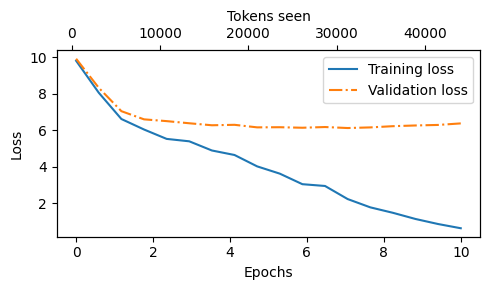
Decoding strategies to control randomness
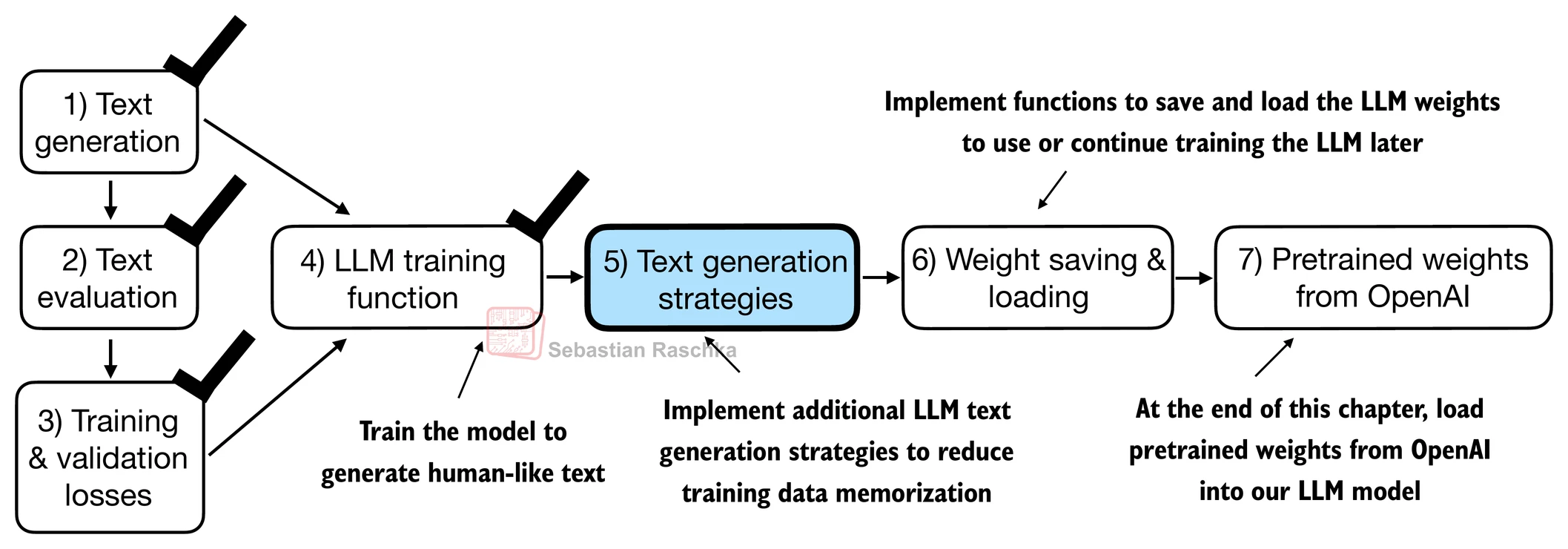
Using the generate_text_simple function (from the previous chapter) that we used earlier inside the simple training function, we can generate new text one word (or token) at a time.
The next generated token is the token corresponding to the largest probability score among all tokens in the vocabulary.
inference_device = torch.device("cpu") # cheap for inference

model.to(inference_device)
model.eval()

tokenizer = tiktoken.get_encoding("gpt2")

token_ids = generate_text_simple(
    model=model,
    idx=text_to_token_ids("Every effort moves you", tokenizer).to(inference_device),
    max_new_tokens=25,
    context_size=GPT_CONFIG_124M["context_length"]
)

print("Output text:\n", token_ids_to_text(token_ids, tokenizer))
Output text:
Every effort moves you?"
"Yes--quite insensible to the irony. She wanted him vindicated--and by me!"
Even if we execute the generate_text_simple function above multiple times, the LLM will always generate the same outputs, so there are 2 main decoding strategies to modify the generate_text_simple: temperature scaling and top-k sampling.
These will allow the model to control the randomness and diversity of the generated text.
Temperature scaling
Previously, we always sampled the token with the highest probability as the next token using torch.argmax.
To add variety, we can sample the next token using The
torch.multinomial(probs, num_samples=1), sampling from a probability distribution.Here, each index’s chance of being picked corresponds to its probability in the input tensor.
Here’s a little recap of generating the next token (with the highest probability torch.argmax), assuming a very small vocabulary for illustration purposes:
vocab = {
    "closer": 0,
    "every": 1,
    "effort": 2,
    "forward": 3,
    "inches": 4,
    "moves": 5,
    "pizza": 6,
    "toward": 7,
    "you": 8,
}

inverse_vocab = {v: k for k, v in vocab.items()}

# Suppose input is "every effort moves you", and the LLM
# returns the following logits for the next token:
next_token_logits = torch.tensor(
    [4.51, 0.89, -1.90, 6.75, 1.63, -1.62, -1.89, 6.28, 1.79]
)

probas = torch.softmax(next_token_logits, dim=0)
next_token_id = torch.argmax(probas).item() # using the highest probability

# The next generated token is then as follows:
print(inverse_vocab[next_token_id])
forward
Instead of determining the most likely token via torch.argmax, we use torch.multinomial(probas, num_samples=1) to determine the most likely token by sampling from the softmax distribution.
torch.manual_seed(123)
next_token_id = torch.multinomial(probas, num_samples=1).item()
print(inverse_vocab[next_token_id])
forward
For illustration purposes, let’s see what happens when we sample the next token 1,000 times using the original softmax probabilities:
def print_sampled_tokens(probas):
    torch.manual_seed(123) # Manual seed for reproducibility
    sample = [torch.multinomial(probas, num_samples=1).item() for i in range(1_000)]
    sampled_ids = torch.bincount(torch.tensor(sample), minlength=len(probas))
    for i, freq in enumerate(sampled_ids):
        print(f"{freq} x {inverse_vocab[i]}")

print_sampled_tokens(probas)
73 x closer
0 x every
0 x effort
582 x forward
2 x inches
0 x moves
0 x pizza
343 x toward
0 x you
We can control the distribution and selection process via temperature scaling.
Basically, it is dividing the logits by a number greater than 0.
Temperatures > 1: more uniformly distributed token probabilities after applying the softmax. → more random
Temperatures < 1: more confident (sharper or more peaky) distributions after applying the softmax. → more deterministic
def softmax_with_temperature(logits, temperature):
    scaled_logits = logits / temperature
    return torch.softmax(scaled_logits, dim=0)

# Temperature values
temperatures = [1, 0.1, 5]  # original, higher confidence, and lower confidence

# Calculate scaled probabilities with different temperature
scaled_probas = [softmax_with_temperature(next_token_logits, T) for T in temperatures]
# Plotting
x = torch.arange(len(vocab))
bar_width = 0.15
fig, ax = plt.subplots(figsize=(5, 3))
for i, T in enumerate(temperatures):
rects = ax.bar(x + i * bar_width, scaled_probas[i], bar_width, label=f'Temperature = {T}')
ax.set_ylabel('Probability')
ax.set_xticks(x)
ax.set_xticklabels(vocab.keys(), rotation=90)
ax.legend()
plt.tight_layout()
plt.savefig("temperature-plot.pdf")
plt.show()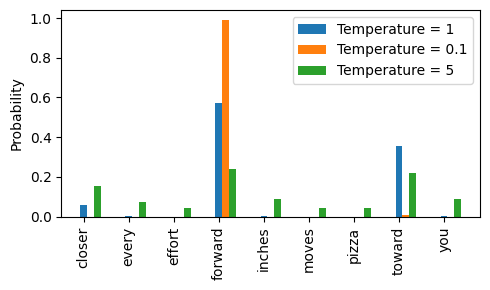
Top-k sampling
To be able to use higher temperatures to increase output diversity and to reduce the probability of nonsensical sentences, we can restrict the sampled tokens to the top-k most likely tokens.
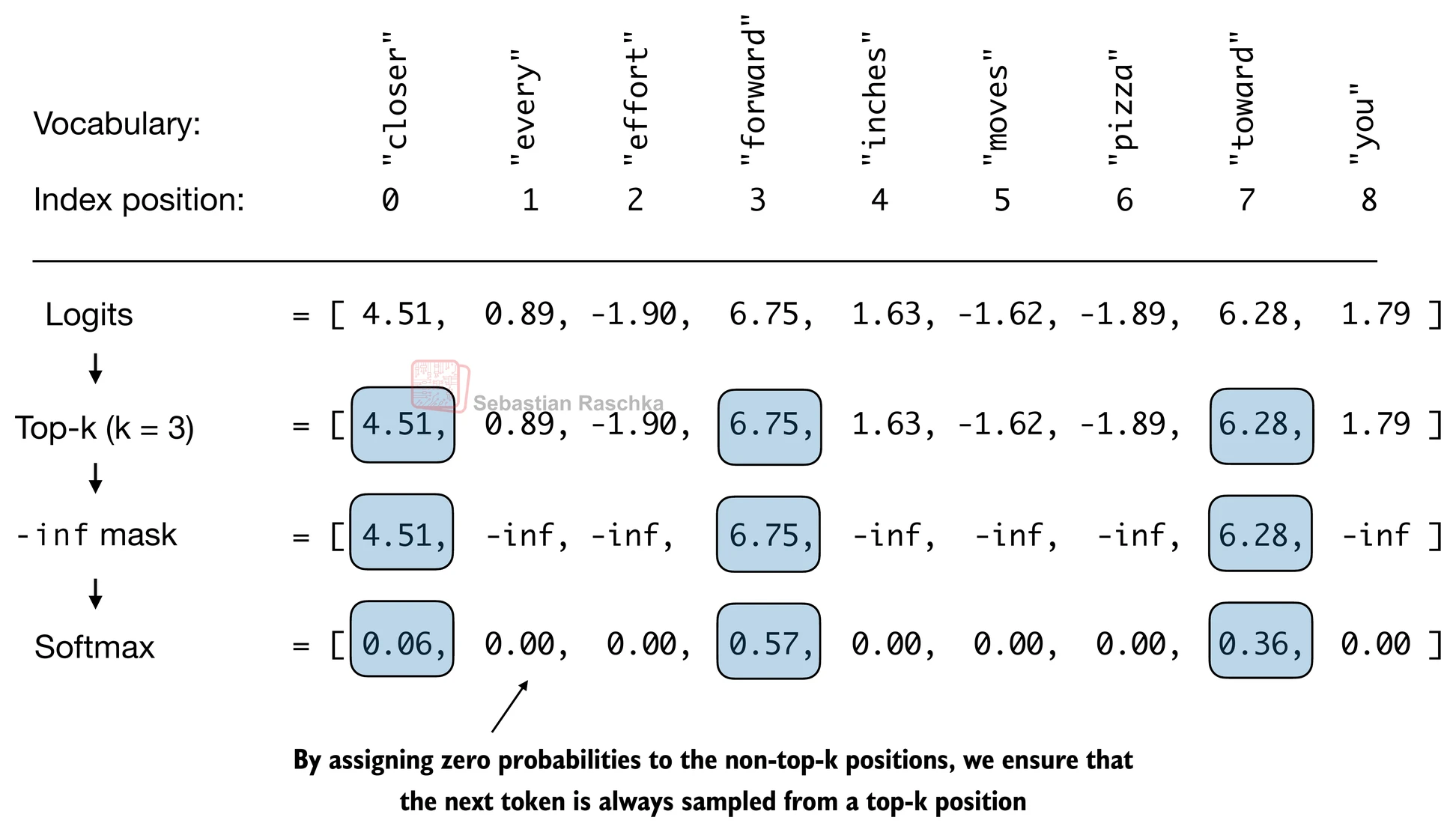
(Please note that the numbers in this figure are truncated to two digits after the decimal point to reduce visual clutter. The values in the Softmax row should add up to 1.0.)
We can implement this as follows:
top_k = 3
top_logits, top_pos = torch.topk(next_token_logits, top_k)

print("Top logits:", top_logits)
print("Top positions:", top_pos)
Top logits: tensor([6.7500, 6.2800, 4.5100])
Top positions: tensor([3, 7, 0])
new_logits = torch.where(
    condition=next_token_logits < top_logits[-1],
    input=torch.tensor(float("-inf")),
    other=next_token_logits
)

print(new_logits)
tensor([4.5100, -inf, -inf, 6.7500, -inf, -inf, -inf, 6.2800, -inf])
topk_probas = torch.softmax(new_logits, dim=0)
print(topk_probas)
tensor([0.0615, 0.0000, 0.0000, 0.5775, 0.0000, 0.0000, 0.0000, 0.3610, 0.0000])
and top- for generation
Let’s use these two concepts to modify the generate_text_simple function, creating a new generate function.
def generate(model, idx, max_new_tokens, context_size, temperature=0.0, top_k=None, eos_id=None):

    # For-loop is the same as before: Get logits, and only focus on last time step
    for _ in range(max_new_tokens):
        idx_cond = idx[:, -context_size:]
        with torch.no_grad():
            logits = model(idx_cond)
        logits = logits[:, -1, :]

        # Filter logits with top_k sampling <== NEW
        if top_k is not None:
            # Keep only top_k values
            top_logits, _ = torch.topk(logits, top_k)
            min_val = top_logits[:, -1]
            logits = torch.where(logits < min_val, torch.tensor(float("-inf")).to(logits.device), logits)

        # Apply temperature scaling <== NEW
        if temperature > 0.0:
            logits = logits / temperature

            # New (not in book): numerical stability tip to get equivalent results on mps device
            # subtract rowwise max before softmax
            logits = logits - logits.max(dim=-1, keepdim=True).values

            # Apply softmax to get probabilities
            probs = torch.softmax(logits, dim=-1)  # (batch_size, context_len)

            # Sample from the distribution
            idx_next = torch.multinomial(probs, num_samples=1)  # (batch_size, 1)

        # Otherwise same as before: get idx of the vocab entry with the highest logits value
        else:
            idx_next = torch.argmax(logits, dim=-1, keepdim=True)  # (batch_size, 1)

        if idx_next == eos_id:  # Stop generating early if end-of-sequence token is encountered and eos_id is specified
            break

        # Same as before: append sampled index to the running sequence
        idx = torch.cat((idx, idx_next), dim=1)  # (batch_size, num_tokens+1)

    return idx
torch.manual_seed(123)
token_ids = generate(
model=model,
idx=text_to_token_ids("Every effort moves you", tokenizer).to(inference_device),
max_new_tokens=15,
context_size=GPT_CONFIG_124M["context_length"],
top_k=25,
temperature=1.4
)
print("Output text:\n", token_ids_to_text(token_ids, tokenizer))Output text:
Every effort moves you?"
His up surprise. And whenever his glory, when by his head
Loading and saving model weights in PyTorch
Training LLMs is computationally expensive, so it’s crucial to be able to save and load LLM weights.
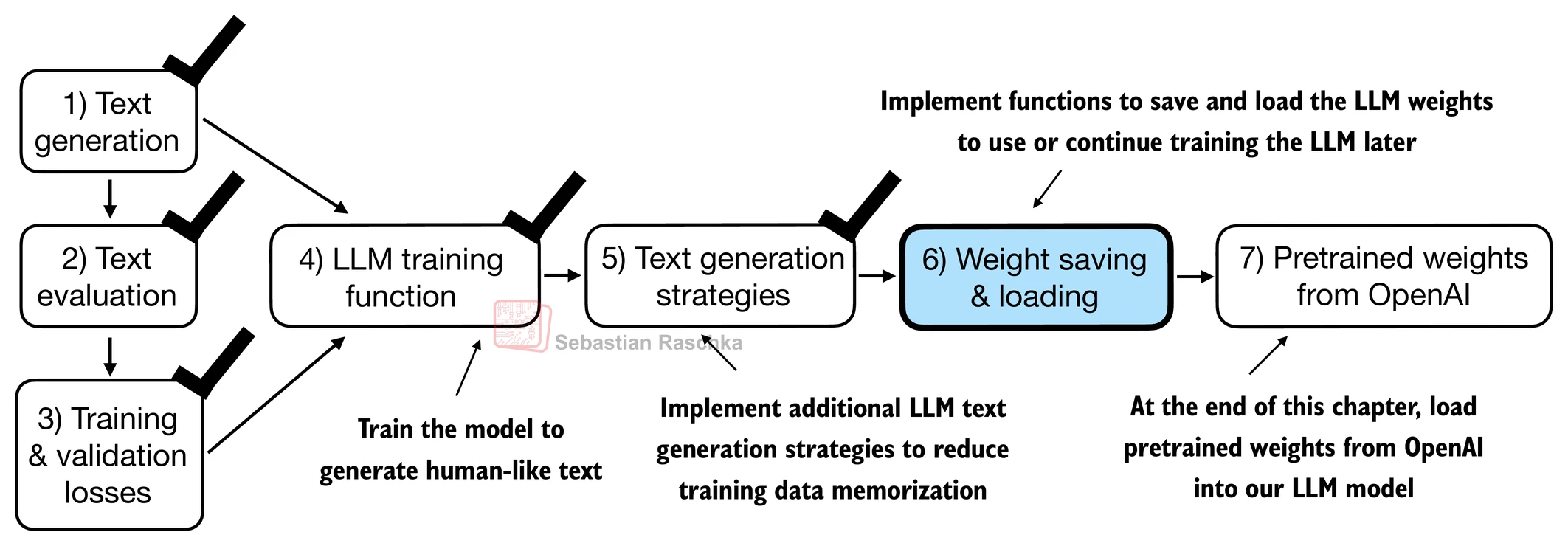
The recommended way in PyTorch is to save the model weights, the so-called state_dict via by applying the torch.save function to the .state_dict() method.
torch.save(model.state_dict(), "model.pth")Then we can load the model weights into a new GPTModel model instance as follows:
model = GPTModel(GPT_CONFIG_124M)

if torch.cuda.is_available():
    device = torch.device("cuda")
elif torch.backends.mps.is_available():
    # Use PyTorch 2.9 or newer for stable mps results
    major, minor = map(int, torch.__version__.split(".")[:2])
    if (major, minor) >= (2, 9):
        device = torch.device("mps")
else:
    device = torch.device("cpu")

print("Device:", device)

model.load_state_dict(torch.load("model.pth", map_location=device, weights_only=True))
model.eval();
Device: cuda
It’s common to train LLMs with adaptive optimizers like Adam or AdamW instead of regular SGD.
These adaptive optimizers store additional parameters for each model weight, so it makes sense to save them as well in case we plan to continue the pretraining later:
torch.save({
    "model_state_dict": model.state_dict(),
    "optimizer_state_dict": optimizer.state_dict(),
    },
    "model_and_optimizer.pth"
)
checkpoint = torch.load("model_and_optimizer.pth", weights_only=True)
model = GPTModel(GPT_CONFIG_124M)
model.load_state_dict(checkpoint["model_state_dict"])
optimizer = torch.optim.AdamW(model.parameters(), lr=0.0005, weight_decay=0.1)
optimizer.load_state_dict(checkpoint["optimizer_state_dict"])
model.train();Loading pretrained weights from OpenAI
First, let’s download the files from OpenAI and load the weights into Python.
⚠️ Note: Some users may encounter issues in this section due to TensorFlow compatibility problems, particularly on certain Windows systems. TensorFlow is required here only to load the original OpenAI GPT-2 weight files, which we then convert to PyTorch.
If you’re running into TensorFlow-related issues, you can use the alternative code below instead of the remaining code in this section.
This alternative is based on pre-converted PyTorch weights, created using the same conversion process described in the previous section. For details, refer to the notebook:
file_name = "gpt2-small-124M.pth"
# file_name = "gpt2-medium-355M.pth"
# file_name = "gpt2-large-774M.pth"
# file_name = "gpt2-xl-1558M.pth"

url = f"https://huggingface.co/rasbt/gpt2-from-scratch-pytorch/resolve/main/{file_name}"

if not os.path.exists(file_name):
    urllib.request.urlretrieve(url, file_name)
    print(f"Downloaded to {file_name}")

gpt = GPTModel(BASE_CONFIG)
gpt.load_state_dict(torch.load(file_name, weights_only=True))
gpt.eval()

if torch.cuda.is_available():
    device = torch.device("cuda")
elif torch.backends.mps.is_available():
    # Use PyTorch 2.9 or newer for stable mps results
    major, minor = map(int, torch.__version__.split(".")[:2])
    if (major, minor) >= (2, 9):
        device = torch.device("mps")
else:
    device = torch.device("cpu")
gpt.to(device);


torch.manual_seed(123)

token_ids = generate(
    model=gpt,
    idx=text_to_token_ids("Every effort moves you", tokenizer).to(device),
    max_new_tokens=25,
    context_size=NEW_CONFIG["context_length"],
    top_k=50,
    temperature=1.5
)

print("Output text:\n", token_ids_to_text(token_ids, tokenizer))
Since OpenAI used TensorFlow, we will have to install and use TensorFlow for loading the weights; tqdm is a progress bar library.
!pip install tensorflow tqdmRequirement already satisfied: tensorflow in /usr/local/lib/python3.12/dist-packages (2.19.0)
Requirement already satisfied: tqdm in /usr/local/lib/python3.12/dist-packages (4.67.2)
Requirement already satisfied: absl-py>=1.0.0 in /usr/local/lib/python3.12/dist-packages (from tensorflow) (1.4.0)
Requirement already satisfied: astunparse>=1.6.0 in /usr/local/lib/python3.12/dist-packages (from tensorflow) (1.6.3)
Requirement already satisfied: flatbuffers>=24.3.25 in /usr/local/lib/python3.12/dist-packages (from tensorflow) (25.12.19)
Requirement already satisfied: gast!=0.5.0,!=0.5.1,!=0.5.2,>=0.2.1 in /usr/local/lib/python3.12/dist-packages (from tensorflow) (0.7.0)
Requirement already satisfied: google-pasta>=0.1.1 in /usr/local/lib/python3.12/dist-packages (from tensorflow) (0.2.0)
Requirement already satisfied: libclang>=13.0.0 in /usr/local/lib/python3.12/dist-packages (from tensorflow) (18.1.1)
Requirement already satisfied: opt-einsum>=2.3.2 in /usr/local/lib/python3.12/dist-packages (from tensorflow) (3.4.0)
Requirement already satisfied: packaging in /usr/local/lib/python3.12/dist-packages (from tensorflow) (26.0)
Requirement already satisfied: protobuf!=4.21.0,!=4.21.1,!=4.21.2,!=4.21.3,!=4.21.4,!=4.21.5,<6.0.0dev,>=3.20.3 in /usr/local/lib/python3.12/dist-packages (from tensorflow) (5.29.5)
Requirement already satisfied: requests<3,>=2.21.0 in /usr/local/lib/python3.12/dist-packages (from tensorflow) (2.32.4)
Requirement already satisfied: setuptools in /usr/local/lib/python3.12/dist-packages (from tensorflow) (75.2.0)
Requirement already satisfied: six>=1.12.0 in /usr/local/lib/python3.12/dist-packages (from tensorflow) (1.17.0)
Requirement already satisfied: termcolor>=1.1.0 in /usr/local/lib/python3.12/dist-packages (from tensorflow) (3.3.0)
Requirement already satisfied: typing-extensions>=3.6.6 in /usr/local/lib/python3.12/dist-packages (from tensorflow) (4.15.0)
Requirement already satisfied: wrapt>=1.11.0 in /usr/local/lib/python3.12/dist-packages (from tensorflow) (2.1.0)
Requirement already satisfied: grpcio<2.0,>=1.24.3 in /usr/local/lib/python3.12/dist-packages (from tensorflow) (1.76.0)
Requirement already satisfied: tensorboard~=2.19.0 in /usr/local/lib/python3.12/dist-packages (from tensorflow) (2.19.0)
Requirement already satisfied: keras>=3.5.0 in /usr/local/lib/python3.12/dist-packages (from tensorflow) (3.10.0)
Requirement already satisfied: numpy<2.2.0,>=1.26.0 in /usr/local/lib/python3.12/dist-packages (from tensorflow) (2.0.2)
Requirement already satisfied: h5py>=3.11.0 in /usr/local/lib/python3.12/dist-packages (from tensorflow) (3.15.1)
Requirement already satisfied: ml-dtypes<1.0.0,>=0.5.1 in /usr/local/lib/python3.12/dist-packages (from tensorflow) (0.5.4)
Requirement already satisfied: wheel<1.0,>=0.23.0 in /usr/local/lib/python3.12/dist-packages (from astunparse>=1.6.0->tensorflow) (0.46.3)
Requirement already satisfied: rich in /usr/local/lib/python3.12/dist-packages (from keras>=3.5.0->tensorflow) (13.9.4)
Requirement already satisfied: namex in /usr/local/lib/python3.12/dist-packages (from keras>=3.5.0->tensorflow) (0.1.0)
Requirement already satisfied: optree in /usr/local/lib/python3.12/dist-packages (from keras>=3.5.0->tensorflow) (0.18.0)
Requirement already satisfied: charset_normalizer<4,>=2 in /usr/local/lib/python3.12/dist-packages (from requests<3,>=2.21.0->tensorflow) (3.4.4)
Requirement already satisfied: idna<4,>=2.5 in /usr/local/lib/python3.12/dist-packages (from requests<3,>=2.21.0->tensorflow) (3.11)
Requirement already satisfied: urllib3<3,>=1.21.1 in /usr/local/lib/python3.12/dist-packages (from requests<3,>=2.21.0->tensorflow) (2.5.0)
Requirement already satisfied: certifi>=2017.4.17 in /usr/local/lib/python3.12/dist-packages (from requests<3,>=2.21.0->tensorflow) (2026.1.4)
Requirement already satisfied: markdown>=2.6.8 in /usr/local/lib/python3.12/dist-packages (from tensorboard~=2.19.0->tensorflow) (3.10.1)
Requirement already satisfied: tensorboard-data-server<0.8.0,>=0.7.0 in /usr/local/lib/python3.12/dist-packages (from tensorboard~=2.19.0->tensorflow) (0.7.2)
Requirement already satisfied: werkzeug>=1.0.1 in /usr/local/lib/python3.12/dist-packages (from tensorboard~=2.19.0->tensorflow) (3.1.5)
Requirement already satisfied: markupsafe>=2.1.1 in /usr/local/lib/python3.12/dist-packages (from werkzeug>=1.0.1->tensorboard~=2.19.0->tensorflow) (3.0.3)
Requirement already satisfied: markdown-it-py>=2.2.0 in /usr/local/lib/python3.12/dist-packages (from rich->keras>=3.5.0->tensorflow) (4.0.0)
Requirement already satisfied: pygments<3.0.0,>=2.13.0 in /usr/local/lib/python3.12/dist-packages (from rich->keras>=3.5.0->tensorflow) (2.19.2)
Requirement already satisfied: mdurl~=0.1 in /usr/local/lib/python3.12/dist-packages (from markdown-it-py>=2.2.0->rich->keras>=3.5.0->tensorflow) (0.1.2)
print("TensorFlow version:", version("tensorflow"))
print("tqdm version:", version("tqdm"))
TensorFlow version: 2.19.0
tqdm version: 4.67.2
# Note that we download gpt_download.py from my github early this chapter
from gpt_download import download_and_load_gpt2
We can then download the model weights for the 124 million parameter model as follows:
settings, params = download_and_load_gpt2(model_size="124M", models_dir="gpt2")checkpoint: 100%|██████████| 77.0/77.0 [00:00<00:00, 141kiB/s]
encoder.json: 100%|██████████| 1.04M/1.04M [00:01<00:00, 745kiB/s]
hparams.json: 100%|██████████| 90.0/90.0 [00:00<00:00, 294kiB/s]
model.ckpt.data-00000-of-00001: 100%|██████████| 498M/498M [04:29<00:00, 1.85MiB/s]
model.ckpt.index: 100%|██████████| 5.21k/5.21k [00:00<00:00, 8.67MiB/s]
model.ckpt.meta: 100%|██████████| 471k/471k [00:01<00:00, 461kiB/s]
vocab.bpe: 100%|██████████| 456k/456k [00:00<00:00, 457kiB/s]
print("Settings:", settings)Settings: {'n_vocab': 50257, 'n_ctx': 1024, 'n_embd': 768, 'n_head': 12, 'n_layer': 12}
print("Parameter dictionary keys:", params.keys())Parameter dictionary keys: dict_keys(['blocks', 'b', 'g', 'wpe', 'wte'])
print(params["wte"])
print("Token embedding weight tensor dimensions:", params["wte"].shape)
[[-0.11010301 -0.03926672 0.03310751 ... -0.1363697 0.01506208
0.04531523]
[ 0.04034033 -0.04861503 0.04624869 ... 0.08605453 0.00253983
0.04318958]
[-0.12746179 0.04793796 0.18410145 ... 0.08991534 -0.12972379
-0.08785918]
...
[-0.04453601 -0.05483596 0.01225674 ... 0.10435229 0.09783269
-0.06952604]
[ 0.1860082 0.01665728 0.04611587 ... -0.09625227 0.07847701
-0.02245961]
[ 0.05135201 -0.02768905 0.0499369 ... 0.00704835 0.15519823
0.12067825]]
Token embedding weight tensor dimensions: (50257, 768)
The difference between differently sized models is summarized in the figure below:
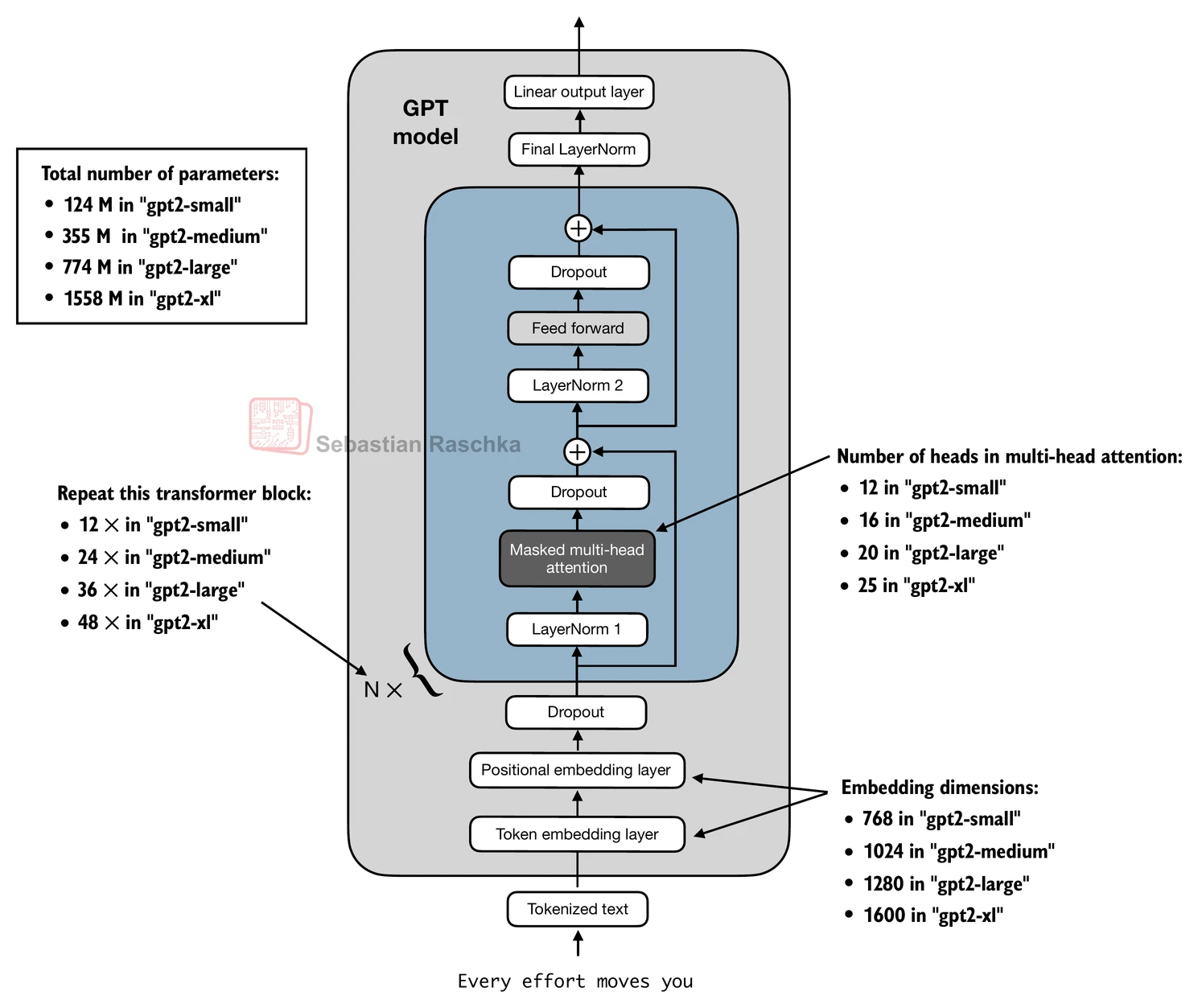
Above, we loaded the 124M GPT-2 model weights into Python, however we still need to transfer them into our GPTModel instance.
First, we initialize a new GPTModel instance.
Note that the original GPT model initialized the linear layers for the query, key, and value matrices in the multi-head attention module with bias vectors, which is not required or recommended; however, to be able to load the weights correctly, we have to enable these too by setting
qkv_biastoTruein our implementation, too.We are also using the
1024token context length that was used by the original GPT-2 model(s).
# Define model configurations in a dictionary for compactness
model_configs = {
    "gpt2-small (124M)": {"emb_dim": 768, "n_layers": 12, "n_heads": 12},
    "gpt2-medium (355M)": {"emb_dim": 1024, "n_layers": 24, "n_heads": 16},
    "gpt2-large (774M)": {"emb_dim": 1280, "n_layers": 36, "n_heads": 20},
    "gpt2-xl (1558M)": {"emb_dim": 1600, "n_layers": 48, "n_heads": 25},
}

# Copy the base configuration and update with specific model settings
model_name = "gpt2-small (124M)"  # Example model name
NEW_CONFIG = GPT_CONFIG_124M.copy()
NEW_CONFIG.update(model_configs[model_name])
NEW_CONFIG.update({"context_length": 1024, "qkv_bias": True})

gpt = GPTModel(NEW_CONFIG)
gpt.eval();
The next task is to assign the OpenAI weights to the corresponding weight tensors in our GPTModel instance.
def assign(left, right):
    if left.shape != right.shape:
        raise ValueError(f"Shape mismatch. Left: {left.shape}, Right: {right.shape}")
    return torch.nn.Parameter(torch.tensor(right))
import numpy as np
def load_weights_into_gpt(gpt, params):
gpt.pos_emb.weight = assign(gpt.pos_emb.weight, params['wpe'])
gpt.tok_emb.weight = assign(gpt.tok_emb.weight, params['wte'])
for b in range(len(params["blocks"])):
q_w, k_w, v_w = np.split(
(params["blocks"][b]["attn"]["c_attn"])["w"], 3, axis=-1)
gpt.trf_blocks[b].att.W_query.weight = assign(
gpt.trf_blocks[b].att.W_query.weight, q_w.T)
gpt.trf_blocks[b].att.W_key.weight = assign(
gpt.trf_blocks[b].att.W_key.weight, k_w.T)
gpt.trf_blocks[b].att.W_value.weight = assign(
gpt.trf_blocks[b].att.W_value.weight, v_w.T)
q_b, k_b, v_b = np.split(
(params["blocks"][b]["attn"]["c_attn"])["b"], 3, axis=-1)
gpt.trf_blocks[b].att.W_query.bias = assign(
gpt.trf_blocks[b].att.W_query.bias, q_b)
gpt.trf_blocks[b].att.W_key.bias = assign(
gpt.trf_blocks[b].att.W_key.bias, k_b)
gpt.trf_blocks[b].att.W_value.bias = assign(
gpt.trf_blocks[b].att.W_value.bias, v_b)
gpt.trf_blocks[b].att.out_proj.weight = assign(
gpt.trf_blocks[b].att.out_proj.weight,
params["blocks"][b]["attn"]["c_proj"]["w"].T)
gpt.trf_blocks[b].att.out_proj.bias = assign(
gpt.trf_blocks[b].att.out_proj.bias,
params["blocks"][b]["attn"]["c_proj"]["b"])
gpt.trf_blocks[b].ff.layers[0].weight = assign(
gpt.trf_blocks[b].ff.layers[0].weight,
params["blocks"][b]["mlp"]["c_fc"]["w"].T)
gpt.trf_blocks[b].ff.layers[0].bias = assign(
gpt.trf_blocks[b].ff.layers[0].bias,
params["blocks"][b]["mlp"]["c_fc"]["b"])
gpt.trf_blocks[b].ff.layers[2].weight = assign(
gpt.trf_blocks[b].ff.layers[2].weight,
params["blocks"][b]["mlp"]["c_proj"]["w"].T)
gpt.trf_blocks[b].ff.layers[2].bias = assign(
gpt.trf_blocks[b].ff.layers[2].bias,
params["blocks"][b]["mlp"]["c_proj"]["b"])
gpt.trf_blocks[b].norm1.scale = assign(
gpt.trf_blocks[b].norm1.scale,
params["blocks"][b]["ln_1"]["g"])
gpt.trf_blocks[b].norm1.shift = assign(
gpt.trf_blocks[b].norm1.shift,
params["blocks"][b]["ln_1"]["b"])
gpt.trf_blocks[b].norm2.scale = assign(
gpt.trf_blocks[b].norm2.scale,
params["blocks"][b]["ln_2"]["g"])
gpt.trf_blocks[b].norm2.shift = assign(
gpt.trf_blocks[b].norm2.shift,
params["blocks"][b]["ln_2"]["b"])
gpt.final_norm.scale = assign(gpt.final_norm.scale, params["g"])
gpt.final_norm.shift = assign(gpt.final_norm.shift, params["b"])
gpt.out_head.weight = assign(gpt.out_head.weight, params["wte"])
load_weights_into_gpt(gpt, params)
gpt.to(device);If the model is loaded correctly, we can use it to generate new text using our previous generate function:
torch.manual_seed(123)

token_ids = generate(
    model=gpt,
    idx=text_to_token_ids("Every effort moves you", tokenizer).to(device),
    max_new_tokens=25,
    context_size=NEW_CONFIG["context_length"],
    top_k=50,
    temperature=1.5
)

print("Output text:\n", token_ids_to_text(token_ids, tokenizer))
Output text:
Every effort moves you as far as the hand can go until the end of your turn unless something happens
This would remove you from a battle
We know that we loaded the model weights correctly because the model can generate coherent text; if we made even a small mistake, the model would not be able to do that.